What Can FitMe Customer Support Help With?
FitMe customer support can help with questions related to the app, your account, workouts, subscriptions, payments, and technical issues.
You can contact the team if you have trouble accessing your account or purchased content, using a feature in the app, or restoring your subscription. Support can also help when you experience other technical problems that prevent you from using FitMe as expected.
Common reasons to contact FitMe customer support include:
- Problems accessing your FitMe account
- Issues with purchased content or workout programs
- Questions about your subscription
- Problems with payments or subscription restoration
- Technical issues with the app
- Questions about app features or functionality
If your question is about a problem with your account, make sure to include as much relevant information as possible in your request. This helps the support team understand what happened and find a solution faster.
How to Contact FitMe Support Through the App
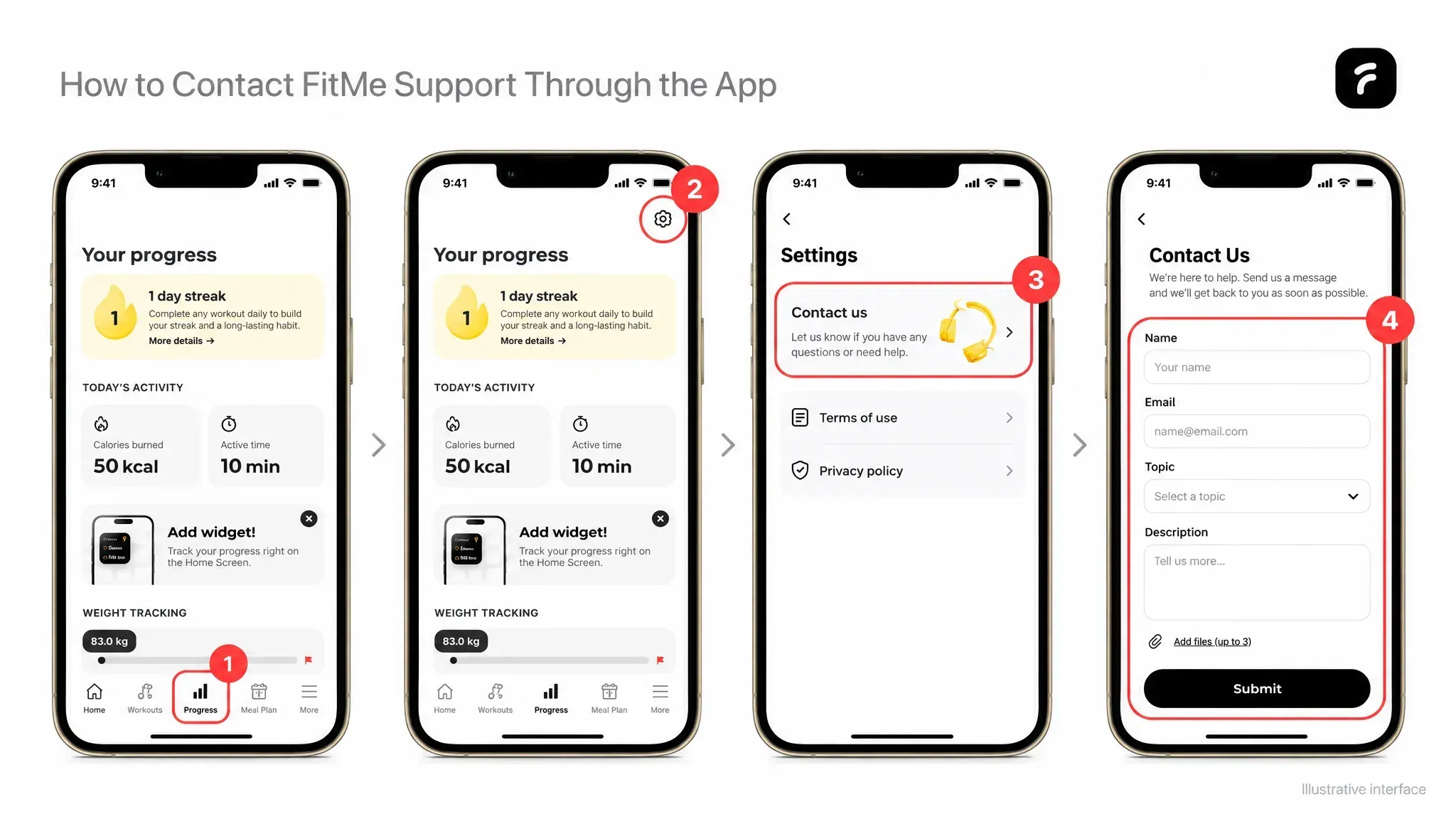
You can contact FitMe customer service directly from the FitMe mobile app. Follow these steps:
Step 1: Open the FitMe app and go to the Progress tab.
Step 2: Tap the Settings icon in the top-right corner.
Step 3: Select Contact Us from the menu.
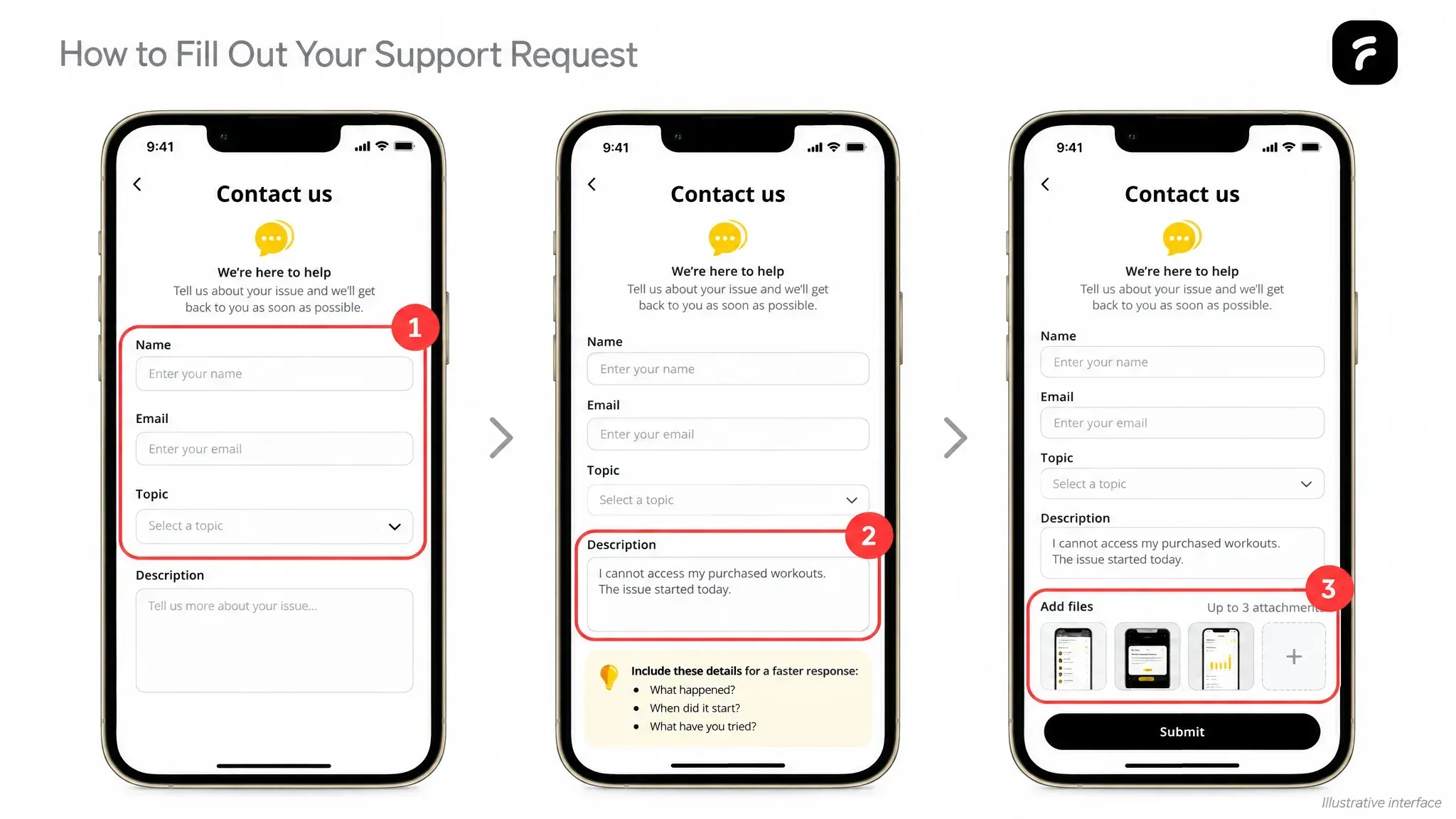
Step 4: Fill out the contact form. You will need to provide:
- Your name
- The email address linked to your subscription
- The topic of your request
- A description of your question or problem
Step 5: Add supporting files if needed. FitMe support allows you to attach up to 3 files, such as screenshots or other materials that help explain the issue.
When you submit the form, FitMe support will receive your request for review.
How to Contact FitMe Support Through the Website
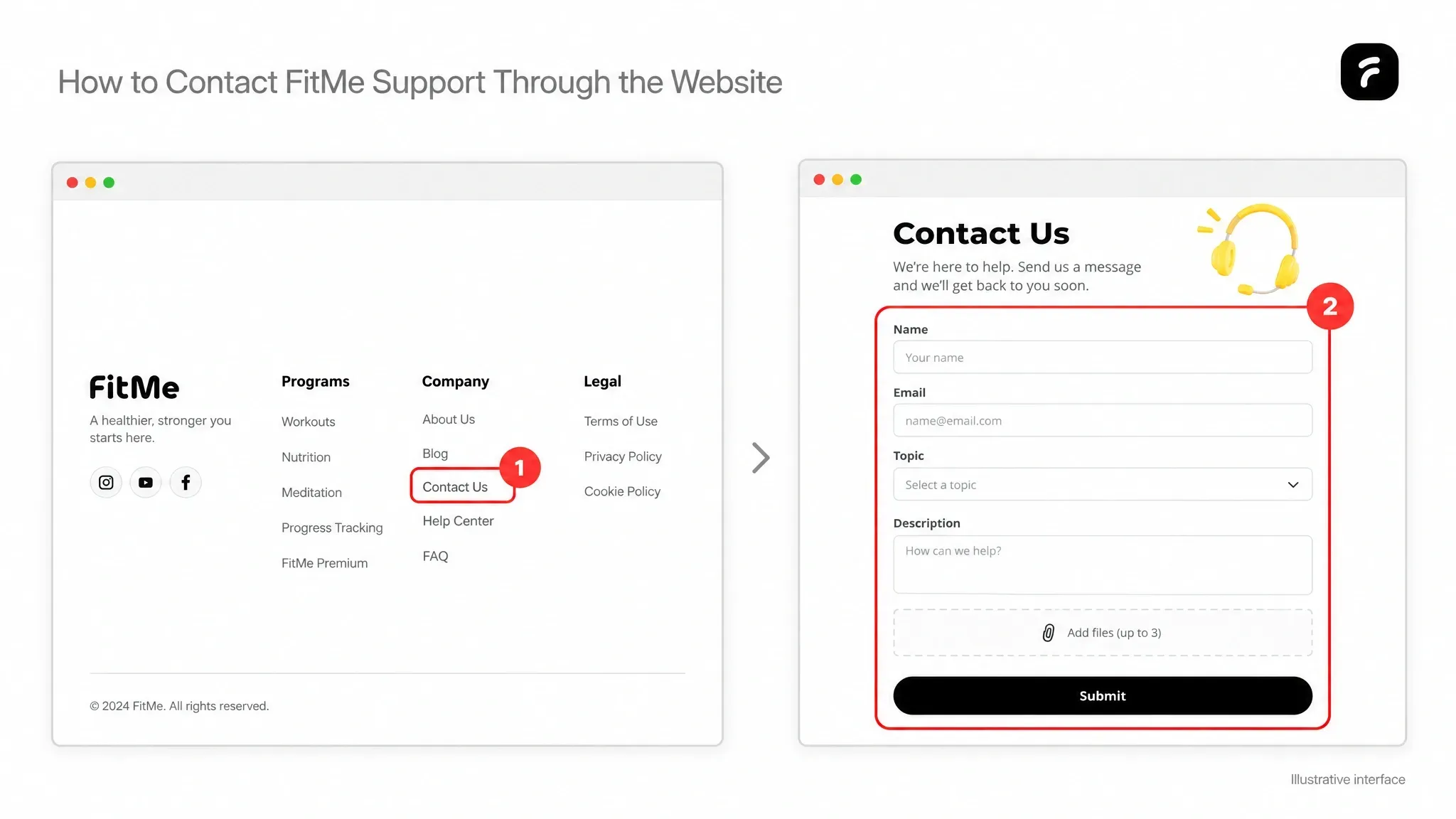
You can also contact FitMe support without using the app. Go to the FitMe website and scroll to the bottom of the page. Find the Contact Us section. Select it to open the contact form . The form works the same way as the one in the app. Provide your:
- Name
- Email address linked to your subscription
- Request topic
- Description of the problem or question
You can also attach up to 3 files if they are useful for explaining the issue. For example, if a feature does not work as expected, a screenshot can show the support team exactly what you see on your screen. This can make it easier to identify the problem.
What to Include in Your Support Request
A detailed request can help the support team understand your situation without needing to ask for additional information.
When contacting FitMe support, make sure your request includes the email linked to your subscription. This is especially important for questions about payments, subscriptions, account access, or purchased content.
You should also explain:
- What happened
- What did you expect to happen
- When the problem started
- Which part of the app or website is affected
- Any steps you have already tried
If possible, attach screenshots or other relevant files. You can include up to 3 attachments through the Contact Us form.
For example, instead of writing, "My subscription isn't working," explain what happens when you try to access it and what message appears on the screen. A specific description gives the support team more information to work with.
How Long Does FitMe Customer Support Take to Reply?
FitMe customer support is available 24/7. Response times can vary depending on the current number of requests, but replies usually arrive within 24–48 hours.
You do not need to send another request if you have not received a reply within a few hours. Your original request is already in the support queue.
In fact, sending multiple requests about the same issue is not recommended. Each new request enters the queue as a new ticket, which can increase the time it takes to receive a response. If you have already contacted support, wait for a reply to the original request rather than submitting the same issue again.
Can You Manage Your Subscription Without Contacting Support?
You can complete some subscription-related actions without contacting FitMe customer service. Where you manage your subscription depends on where you purchased it.
If you subscribed through the Apple App Store or Google Play, subscription management is handled through the platform. You can use your Apple or Google account settings to manage the subscription.
If you purchased your subscription through the FitMe website, you can use Manage Subscription to manage your web subscription. This can be useful if you need to make a subscription-related change and do not need help from the support team.
Where to Find Answers Without Contacting Support
Not every question requires a support request. FitMe has several resources where you can find information about the app, programs, workouts, and subscriptions.
FAQ
The FAQ section on the FitMe website contains answers to common questions about FitMe, its programs, and subscriptions. If you have a general question, check the FAQ before contacting support. You may find the answer without waiting for a response.
Programs
The Programs section provides information about the fitness programs available through FitMe. These include Chair Yoga, Pilates, Walking, Tai Chi, Calisthenics, Weight Loss, and other options. If you are trying to choose a program based on your goals or want to understand what different programs offer, start with this section.
Blog
The FitMe Blog contains detailed articles about workouts, fitness programs, and other topics related to using FitMe. It can be a useful place to find more detailed information before sending a support request.
Checking the FAQ, Programs, and Blog first can help you find an answer faster. If you cannot find the information you need or are experiencing a problem with your account or the app, you can then contact FitMe support directly.
Help Center
The FitMe Help Center is a knowledge base with step-by-step articles on accounts, subscriptions, payments, and app features. Search for your question or browse by topic. Many common issues can be solved in a few minutes without waiting for a reply from support.